

Notes we’d send a friend
Updates from projects we're working on and lessons we're learning.
Sent when there's actually something to say.
.webp)
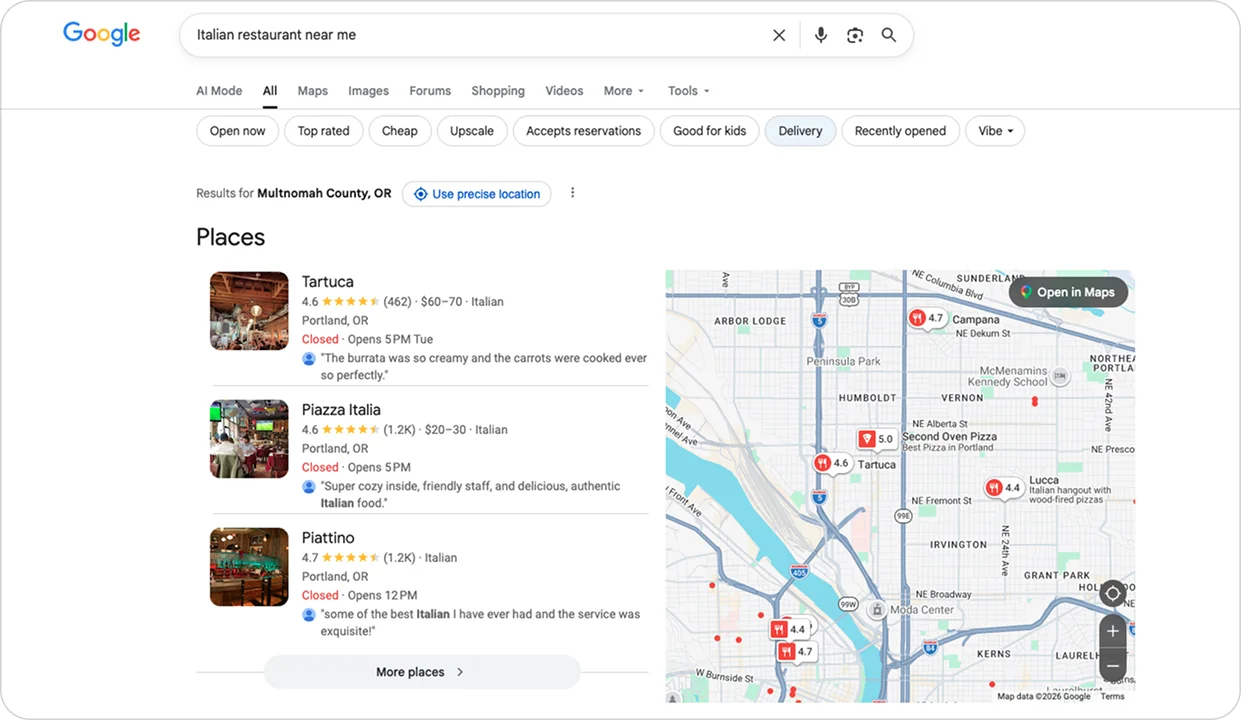
Think about the last time you searched for a place to eat — maybe you typed "Italian restaurant" and a map popped up with restaurants. When you wanted a good coffee, you searched "best coffee shop near me". Or that time you had a burst pipe and frantically searched "emergency plumber" at 9 PM.
You probably didn't scroll through a list of websites. You looked at the map, saw the businesses with their ratings and open hours, and either called one or got directions to their place.
That's Google Business Profile in action.
When someone searches for a service, Google doesn't just show websites — it shows a map with three businesses in your area pinned to it. That's the Local Map Pack, powered by Google Business Profile.
Most Google searches end without a click to any website. People get everything they need directly from your Google Business Profile. They call you, book appointments, or navigate to your location without ever visiting your website.
Businesses appearing in the Local Map Pack (top 3 positions) receive a disproportionately high share of clicks compared to those below the pack. In many local searches, the majority of user actions happen directly within these three listings.
Businesses with complete and fully optimized Google Business Profiles typically see significantly higher engagement. Often several times more clicks, calls, and direction requests — compared to incomplete profiles.
For most local businesses, your Google Business Profile isn't just a profile. It's the first thing people see when they search for your services — and the deciding factor in whether they call you or your competitor.
But first, we need to clear up the biggest misconception: not everyone can have a Google Business Profile.

Most people assume anyone can create a Google Business Profile. That's not true. Google has strict rules about who qualifies, and violating them gets your profile suspended. Which means you lose everything: reviews, photos, ranking history, all of it.
Google's official eligibility guideline is clear: "To qualify for a Business Profile, a business must make in-person contact with customers during its stated hours."
Google checks two things:
The key is that there's a real business with real human interaction, not just a website collecting emails.
Here's where people run into trouble when they create a Google Business Profile for the first time.
Using virtual offices or P.O. boxes as your only address will get you suspended. Creating multiple fake listings at different addresses for the same business will too. Using random residential addresses where you don't actually operate, or pretending you offer in-person services when you're 100% online, triggers immediate removal.
Google's complete guidelines for representing your business warn: "Google reserves the right to suspend access to Business Profiles to individuals or businesses that violate these guidelines."
Once you've confirmed you qualify, you need to understand which type fits your business. There are three, and each works differently.
Physical locations customers visit. Your address shows publicly on Google Maps. Think restaurants, retail stores, salons, and medical offices. Customers find you on Maps, click for directions, see your hours and photos, and come to your location.
If you have a dedicated home office and customers come to you — like a home-based hair salon or a consultant who meets clients at home — you're a Storefront Business. Your address shows publicly. Even if you work mostly online but offer occasional in-person meetings, that counts.
For businesses that go to customers. Your address is hidden from the public. Only your city or zip code shows. Plumbers, electricians, cleaning services, and mobile pet groomers fit here. You define service areas (cities or a radius), and Google verifies your address on the backend but doesn't show it to customers.
If you travel to customers and operate from a home base — like a mobile pet groomer or a plumber — Service Area Business is ideal. You hide your home address, and customers see "Serves Brooklyn and surrounding areas" instead of your street address. You still rank in local searches without exposing where you live.
Google uses that hidden address as the center point for ranking you in searches.
Both physical location and travel to customers. A veterinary clinic with an office plus house calls. An HVAC company with a showroom that also does installations. A fitness studio with a gym that also offers personal training at clients' homes. You show your address publicly and define service areas.
Choosing the right type of Google Business Profile matters because it affects how and where you show up in local searches.
Google uses three main factors to decide which businesses appear in the top 3 spots. How complete and accurate your GBP is matters most, followed by what customers say about you in reviews and how people actually interact with your business profile (clicks, calls, directions).
Google's official ranking guidance states: "Businesses with complete and accurate information are more likely to show up in local search results."
Here's how each factor works.
Relevance is how well your business matches what someone searched for. If someone types "pizza restaurant near me," Google looks at your business category.
The key: be as specific as possible with your primary category.
Category is the most important factor
Google offers over 4,000 business categories. You can select up to 10 total: 1 primary category (which carries the most weight) and up to 9 secondary categories to cover additional services.
Your primary category must be the most specific match for what you do. If you're a plumber, choose "Plumbing Contractor," not just "Contractor." Google's official category guidelines emphasize: "Select a primary category that best describes your business."
Beyond categories, Google also looks at your services, business description, and attributes (like "outdoor seating" or "free Wi-Fi"). The more complete and specific your profile, the better you match relevant user searches.
Distance is purely geographic. For "near me" searches, Google prioritizes businesses within about 8-16 kilometers (5-10 miles) of whoever's searching. This is where location becomes everything, and it often trumps every other factor.
Say someone's looking for a hair salon:
Proximity beats optimization for "near me" searches. Same with coffee shops: if you're 5 blocks away with 20 reviews, you'll beat a shop 3 kilometers (2 miles) away with 200 reviews.
For service area businesses, location works differently but still matters. If you're a plumber with your address in downtown Novi Sad, you'll rank across the entire city. If your address is in Sremska Kamenica on the outskirts, you'll rank strongest there but weaker downtown. Google uses your verified address (even if it's hidden) as the center point for ranking.
What this means: For storefront businesses, location matters more than anything for "near me" searches. Central locations capture way more search volume. For service area businesses, being centrally located within your service area gives you better rankings across that entire area. The farther you are from your target customers, the stronger your local SEO optimization needs to be to compete with closer businesses.
Prominence is Google's way of measuring how popular and credible your business is. Similar to how Google evaluates trustworthiness and authority for websites overall.
Reviews are the biggest signal. Not just how many you have, but their quality, recency, and velocity. Here's what most people don't understand: review recency matters more than count. A business with 50 reviews where the most recent is from 2 years ago loses to a business with 10 fresh reviews from the past month.
Fresh reviews that demonstrate real experience with your business carry more weight than generic ratings. Businesses with 4.5+ star ratings get 3.5x more clicks than lower-rated competitors.
Google tracks review velocity. Consistent monthly flow of new reviews signals an active, popular business. Getting 20 reviews all at once looks suspicious. Fresh, steady reviews look natural.
The businesses that rank highest for prominence have consistent fresh reviews, high engagement, accurate information across multiple platforms, extended hours compared to competitors, and quality photos showing real work.
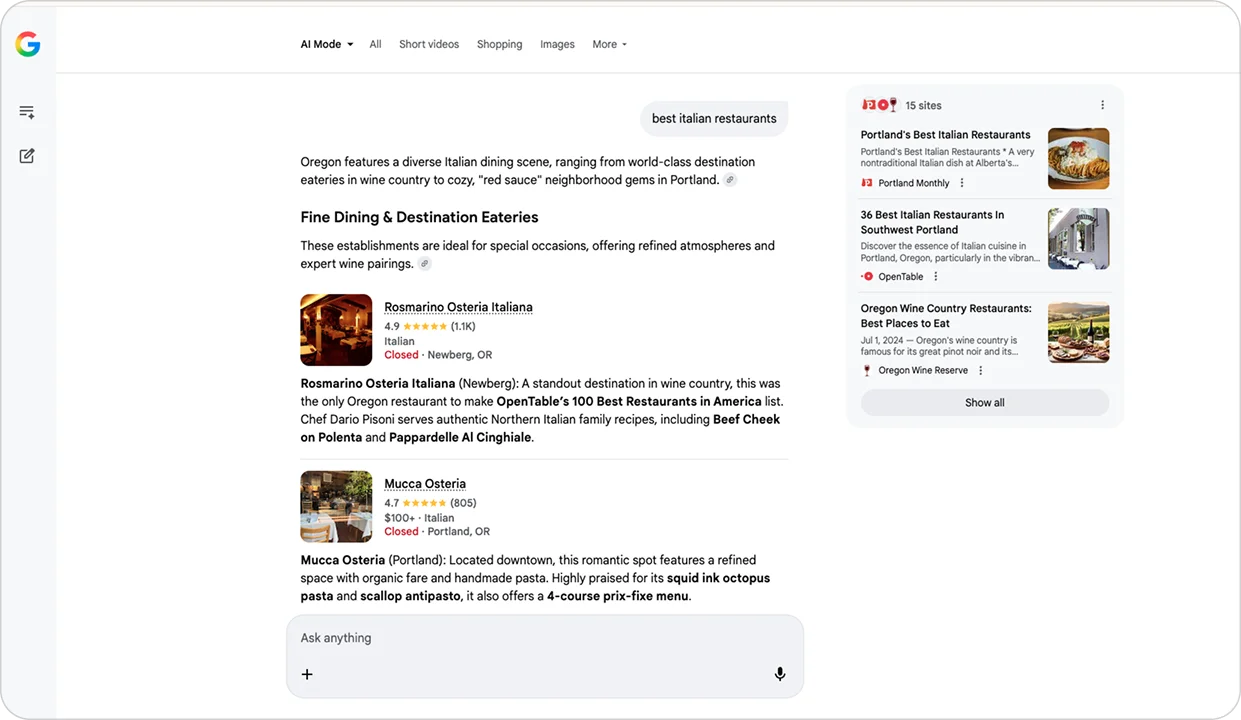
Here's what changed in the past couple years: people get answers directly from Google and AI bots without clicking anything.
When someone searches or asks AI for "coffee shops with outdoor seating," they don't see a list of links anymore. They see an AI-generated answer that says something like "Blue Bottle Coffee on Main Street has outdoor seating, free Wi-Fi, and is open until 8 PM. Customers mention the patio is great for working."
Where did AI get that information? From your Google Business Profile.
Google's AI pulls from several parts of your profile: your business description (what you do and who you serve), your services section (detailed descriptions of what you offer), your attributes (outdoor seating, wheelchair accessible, free Wi-Fi), and your review content (what customers actually say about you).
When someone asks "which plumbers offer emergency service at night?", Google's AI scans local plumber profiles looking for clues. If your services section says "24/7 emergency plumbing" and your attributes show "24-hour availability" and customers in reviews mention "fast response" and "emergency service," Google's AI puts that together and cites you in the answer.
If your profile is incomplete (no services listed, no attributes selected, vague description), AI can't cite you. You're invisible even if you're the best plumber in town.
Google retired the traditional Q&A feature in November 2025 (the Q&A API was officially deprecated). Now there's an AI-powered "Ask about this place" feature where AI generates answers using your profile data, website content if you have one, review content, and photos.
If someone asks "Does Joe's Plumbing offer same-day service?" and your profile doesn't mention it anywhere, AI might say "I don't have information about their availability," even if you do offer same-day service. You just never told Google.
This shift means businesses need to be more explicit about what they offer. If you offer something, it needs to be written clearly in your profile somewhere: in your description, services section, or attributes.
More people are asking questions out loud instead of typing. "Where's the nearest gas station?" "Which plumbers are open right now?" "Coffee shops with parking near me?"
Voice assistants answer these queries using local business data. Google Assistant pulls from your GBP, Siri uses Apple Maps, and Alexa uses Yelp. Consistency across all platforms matters. Wrong hours on one platform means lost voice search traffic from that assistant. Mismatched phone numbers confuse customers.
Voice search is huge for local businesses because people use it when they need something immediately.
Google Business Profile isn't a side project. For most local businesses, it's the most important piece of your online presence. More important than your website. More important than social media. More important than paid ads.
Why? Because when someone in your area needs what you offer right now, they search Google. And Google shows them the Map Pack. If you're not in those top three spots, you're invisible to most people. And if your profile is incomplete, AI doesn't cite you in answers.
The businesses that understand this (who take their GBP seriously, keep it updated, respond to reviews, maintain accurate information) dominate local search. The ones who ignore it or treat it like an afterthought wonder why competitors get all the calls.
Location matters for proximity. Relevance comes from clear categories and complete profiles. Prominence comes from reviews, engagement, and consistency across the web. AI visibility comes from detailed services, attributes, and review content.
You can't control where you're located, but you control everything else. And "everything else" is usually enough to win if you actually do it.
Pro tip: The same principles apply to other local business platforms like Bing Places and Yelp. Maintaining consistent, complete profiles across all local SEO platforms strengthens your overall local search presence.
No. Website not required. Many local businesses operate with GBP only. However, having one helps with verification, AI citations, and trust.
Yes, if customers come to you (home salon or consultant) or you travel to them (mobile service). Set up as Service Area Business to hide your home address.
Three common reasons: too far away (distance matters most for "near me"), category doesn't match search terms (too vague), or profile incomplete. Also check if you're verified.
Storefront: Customers visit you; the address shows publicly. Service Area: you go to customers, the address is hidden (only the city/service area is shown). Hybrid: both.
Video (walkthrough showing signage/entrance), postcard (code mailed to address), phone (SMS code), or email (rare). Google also cross-checks with your website and online mentions.
Yes. Address hidden from customers (they see city/service area only), but Google still verifies it on the backend. Perfect for home-based businesses.
Recency matters more than quantity. 10 fresh reviews from the past month beat 50 old reviews from 2 years ago. Also, proximity beats reviews: a business 2 blocks away with mediocre reviews beats one 10 miles away with perfect reviews.
Profile gets suspended. You lose everything: reviews, photos, ranking history. No warning, you just disappear from local search. Common violations: fake locations, virtual offices only and keyword stuffing in business names. An appeal is possible but difficult.
Updates from projects we're working on and lessons we're learning.
Sent when there's actually something to say.